7 Repetitive Tasks You Should Stop Doing Manually
For most professionals, the primary challenge is not a lack of time.
Instead, the issue often lies in the repetitive nature of daily tasks.
Every day, professionals spend substantial time on tasks that, though essential, do not directly add value. Activities such as searching for information, summarizing documents, composing routine emails, updating project status reports, and formatting presentations are all necessary, yet highly repetitive aspects of modern work.
The good news is that many of these repetitive tasks can now be partially or fully automated using artificial intelligence (AI). While automation streamlines these processes, it does not eliminate the need for professional expertise, judgment, or decision-making. Instead, it minimizes the manual effort required to move from input to output.
The objective is not to automate every aspect of professional work.
The aim is to allocate less time to repetitive tasks and more to work that demands human insight and critical thinking.
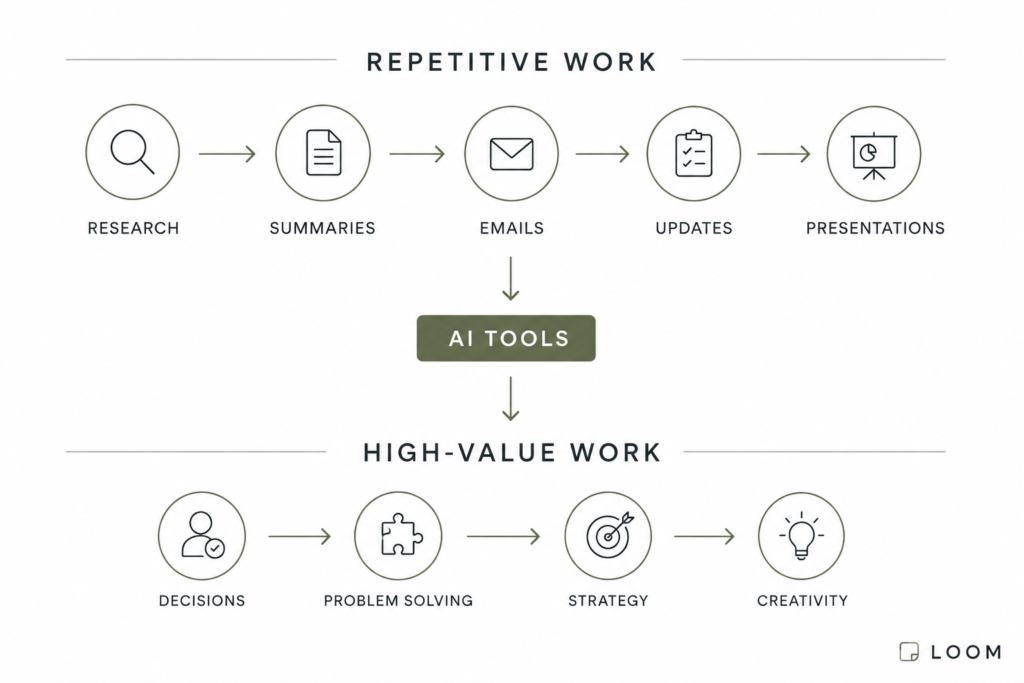
Diagram showing how AI tools reduce repetitive work and increase time available for strategic work.
Before proceeding, it is useful to identify common tasks that are well-suited for automation. Understanding these tasks in detail clarifies the potential impact of automation in professional environments. The following are seven repetitive tasks that professionals should consider automating.
1. Researching Information
The Problem
Research often starts with a simple question.
Within minutes, professionals may find themselves managing numerous browser tabs, comparing sources, opening documents, and attempting to identify relevant information.
For knowledge workers, research frequently becomes a significant, yet often overlooked, drain on productivity.
Typical Manual Process
- Search Google
- Open multiple websites
- Compare information
- Verify sources
- Organize findings
Estimated time:
30–60 minutes
AI Solution
Tools such as Perplexity can substantially decrease the time required to gather information.
Rather than manually collecting sources, users receive a summarized response accompanied by references and links for verification.
Although the final review still requires human judgment, much of the initial research effort is eliminated.
Potential Time Saved
15–45 minutes per research session
2. Summarizing Long Documents
The Problem
Reports, proposals, contracts, technical documentation, meeting transcripts, and industry studies often contain valuable information.
The primary challenge lies in efficiently identifying the most important information.
Reading hundreds of pages manually is rarely the best use of time.
Typical Manual Process
- Read the entire document.
- Highlight key points
- Extract conclusions
- Create a summary
Estimated time:
30–90 minutes
AI Solution
Tools such as Claude and ChatGPT can summarize long documents, identify major themes, extract action items, and answer questions about the content.
Rather than starting from page one, you can begin with a high-level overview and then dive deeper where necessary.
Potential Time Saved
20–60 minutes per document
3. Taking Meeting Notes
The Problem
Many professionals attend meetings, take notes during discussions, compose summaries afterward, and subsequently distribute action items to their teams.
The meeting itself may require only thirty minutes.
However, the associated administrative tasks can consume nearly as much time.
Typical Manual Process
- Attend meeting
- Take notes
- Create summary
- Send follow-up email
- Track action items
Estimated time:
30–60 additional minutes
AI Solution
AI meeting assistants, including Fathom, Fireflies, and Otter, can automatically record, transcribe, summarize, and organize meeting content.
This allows professionals to focus on active participation rather than documentation.
Potential Time Saved
20–50 minutes per meeting
4. Drafting Routine Emails
The Problem
Not every email requires deep thinking.
Many messages follow familiar patterns:
- Follow-ups
- Status updates
- Internal communications
- Client responses
- Scheduling requests
Composing these messages manually for each instance introduces unnecessary repetition.
Typical Manual Process
- Open email
- Write from scratch
- Review wording
- Edit for clarity
Estimated time:
5–15 minutes per email
AI Solution
Tools like ChatGPT and Claude can generate professional drafts from short prompts.
While the user remains responsible for the final message, the challenge of starting from a blank page is mitigated.
Potential Time Saved
3–10 minutes per email
5. Creating First Drafts
The Problem
Many projects begin with a blank page.
Whether drafting an article, preparing a report, outlining a proposal, or planning a presentation, the initial draft frequently represents the most time-consuming phase.
Typical Manual Process
- Brainstorm ideas
- Create structure
- Write initial draft
- Organize sections
Estimated time:
30–120 minutes
AI Solution
ChatGPT and Claude can generate outlines, produce initial drafts, suggest organizational structures, and arrange ideas.
The output typically requires further refinement before reaching its final form.
However, these tools can significantly accelerate the initial drafting phase.
Potential Time Saved
20–90 minutes per project
6. Updating Project Status
The Problem
Project management is more than completing tasks.
Teams also allocate time to updating progress, assigning responsibilities, generating summaries, and tracking subsequent steps.
These administrative updates often add little value on their own.
Typical Manual Process
- Review completed work
- Update tasks
- Create a status report
- Communicate progress
Estimated time:
15–45 minutes
AI Solution
Tools such as ClickUp AI can automatically summarize activities, generate updates, create task descriptions, and organize project information.
This reduces administrative overhead and keeps projects moving.
Potential Time Saved
10–30 minutes per update cycle
7. Designing Presentations
The Problem
Creating presentations often requires far more formatting than actual thinking.
Although content may be prepared, transforming it into a polished slide deck requires additional effort.
Typical Manual Process
- Create slides
- Format layouts
- Add visuals
- Adjust design
- Refine structure
Estimated time:
1–3 hours
AI Solution
Applications such as Gamma can convert outlines, notes, and documents into presentation drafts within minutes.
Professionals can then refine the generated draft rather than starting from scratch.
Potential Time Saved
30–120 minutes per presentation
Estimated Weekly Time Savings
Automating repetitive work tasks can lead to significant time savings each week. By streamlining processes such as research, document summarization, routine emails, status updates, and presentation formatting, professionals can reclaim valuable hours that would otherwise be spent on manual work. These recovered hours can then be redirected toward more strategic, impactful activities that contribute directly to organizational goals. The cumulative effect of automating even a few repetitive tasks can free up substantial time over the course of a week, enhancing both productivity and job satisfaction.
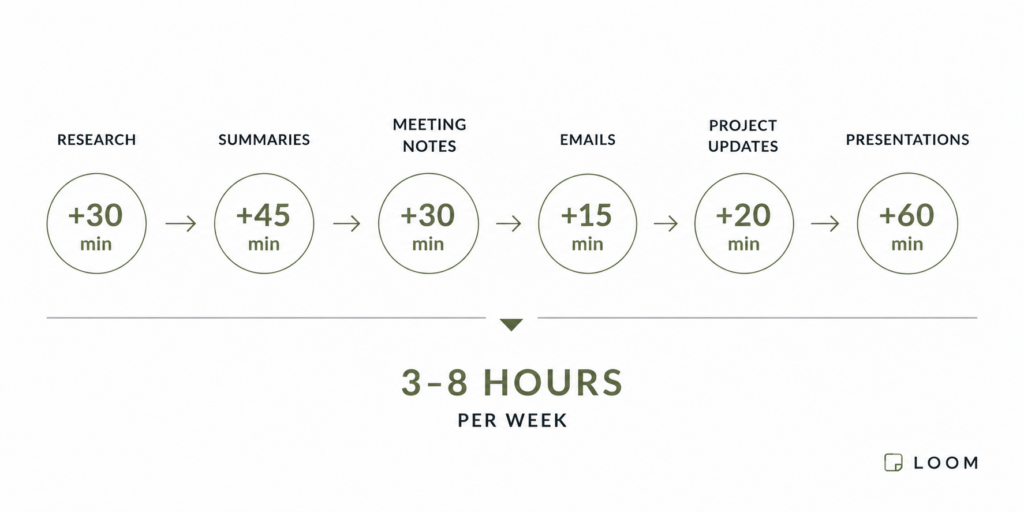
Visual summary of estimated weekly time savings from automating repetitive tasks.
Even modest improvements across several repetitive tasks can recover multiple hours every week.
Conclusion
Not every task needs to be automated.
Professionals should use good judgment to decide which tasks truly benefit from automation. The most valuable work—requiring judgment, expertise, creativity, and thoughtful decisions—remains best handled by people. In contrast, many routine activities do not require these qualities. Gathering research, summarizing meetings, writing routine emails, updating statuses, and formatting presentations are all predictable tasks that are increasingly easy to automate. By removing just a few of these repetitive tasks from your weekly schedule, you can reclaim several hours each week.
The objective isn’t to work more, but to spend less time on repetitive tasks and more on work that genuinely matters.
In the next article, we’ll look at how these tools can be combined into a complete AI workflow.