10 AI Tools That Save 5+ Hours Per Week
Introduction
For most professionals, the challenge is not a lack of apps, but an abundance of repetitive tasks.
Each week, knowledge workers spend significant time drafting emails, attending meetings, searching for information, coordinating projects, reviewing documents, and designing presentations. Individually, these tasks may seem minor, but collectively they consume a substantial part of the workweek. Many professionals spend more time managing information than acting on it.
This is where artificial intelligence excels. Its value lies not in replacing your expertise or making decisions for you, but in automating repetitive tasks, streamlining processes, and allowing you to focus on work that requires human insight.
The tools listed here address practical business challenges. They integrate smoothly into existing workflows and help professionals reclaim valuable time without adding complexity. Many of these solutions connect directly with widely used platforms such as Google Workspace, Slack, and Microsoft Teams, making it easy to incorporate them alongside your current tools for truly seamless adoption.
Whether you are a consultant, project manager, entrepreneur, freelancer, designer, marketer, or knowledge worker, these tools can help you work more efficiently and with greater clarity.
The tools highlighted here represent only a small selection of options available to professionals, and each role or task may benefit from different solutions. The examples in this guide illustrate practical applications within real-world contexts. Given the rapidly changing AI landscape, where frequent advancements introduce new features and tools, professionals should stay informed and adaptable. Regularly assessing and updating workflows in response to these developments is essential for maintaining efficiency and competitiveness.
What Makes an AI Tool Worth Using?
The world of AI software evolves at a remarkable pace. New products, features, and updates appear almost every week, but only a few become essential parts of a professional’s everyday work. For this selection, we evaluated tools based on four key criteria.
1. It solves a real problem
A valuable tool addresses a real business problem, providing practical solutions rather than unnecessary features. It responds to common professional challenges, making work more efficient and effective.
2. It saves measurable time
The primary goal is to reduce your workload. The best AI tools handle tedious, time-consuming tasks, allowing you to focus on high-impact work.
3. It is easy to adopt
A useful AI tool integrates easily into daily routines without a steep learning curve. The most effective solutions are intuitive, require minimal adjustment, and deliver immediate value.
4. It improves existing workflows
The most effective tools enhance existing workflows rather than disrupt them. They integrate seamlessly, enabling incremental improvements and increased productivity without unnecessary friction or steep learning curves.
How can AI help you in your workflow?
1. ChatGPT
Best For
Writing, brainstorming, problem-solving, drafting, and everyday productivity.
Why It Saves Time
Many professionals spend valuable time organizing initial ideas and getting started. ChatGPT accelerates this process by generating first drafts, shaping ideas, summarizing key points, and expediting routine writing tasks.
While the output is rarely final, it provides a strong foundation. The main benefit is overcoming creative blocks and starting more quickly.
Typical Use Cases
- Brainstorming
- Content outlines
- Summaries
- Email drafting
- Project planning
- Documentation
- Research assistance
Real-World Example
Every week, a project manager is responsible for compiling a project update to keep stakeholders informed and ensure the team remains aligned. Instead of spending an hour manually structuring the report, the manager can simply share their project notes with ChatGPT. In just a few minutes, they receive a clear and well-organized first draft. This approach allows them to focus their energy on reviewing, refining, and personalizing the content, making the whole process faster, more efficient, and less daunting than starting from scratch.
Estimated Time Saved
1–3 hours per week
Best Workflow
Notes → ChatGPT Draft → Human Review → Final Document
2. Claude
Best For
Complex analysis, large documents, spreadsheets, reports, and professional knowledge work.
Why It Saves Time
Claude excels at processing large amounts of information and transforming them into structured outputs.
For professionals, this reduces time spent reviewing documentation, analyzing data, interpreting spreadsheets, and preparing executive summaries.
Typical Use Cases
- Long reports
- Spreadsheet analysis
- Business documentation
- Financial models
- Research synthesis
- Data organization
- Executive summaries
- Presentation preparation
Real-World Example
A consultant may receive a multi-tab spreadsheet, several client reports, and meeting notes from multiple stakeholders. Instead of manually reviewing each file, they can use Claude to identify patterns, summarize findings, highlight inconsistencies, and draft an executive summary. This streamlines the process, allowing the consultant to focus on interpreting results and making strategic recommendations.
Estimated Time Saved
2–5 hours per week
Best Workflow
Data → Claude Analysis → Executive Summary → Presentation
3. Perplexity
Best For
Research, source discovery, market intelligence, and fact gathering.
Why It Saves Time
Traditional online research can be time-consuming and overwhelming, often involving tedious tasks such as opening countless browser tabs, sifting through fragmented information, and manually comparing sources for accuracy and relevance.
Perplexity dramatically reduces that process.
Typical Use Cases
- Industry research
- Competitor analysis
- Trend monitoring
- Fact-checking
- Source discovery
- Market research
Real-World Example
A consultant needs to evaluate several project management platforms before making a recommendation.
Instead of spending hours collecting information across vendor websites and blog posts, Perplexity generates a structured overview with sources and supporting references.
Estimated Time Saved
2–4 hours per week
Best Workflow
Research Question → Perplexity → Claude Analysis → Final Recommendation
4. Fireflies.ai
Best For
Meeting transcription and action item management.
Why It Saves Time
Meetings often require additional work after they conclude, such as accurately capturing what was discussed, decided, and assigned. This documentation is essential for follow-up, accountability, and alignment.
Fireflies automatically records conversations, generates summaries, and identifies action items. Fireflies integrates particularly well with project management systems, making it a strong choice for teams that need meeting notes to become actionable tasks.
Typical Use Cases
- Team meetings
- Client meetings
- Project reviews
- Internal updates
- Discovery calls
Real-World Example
A typical team may hold six meetings a week, each producing key discussions and decisions. Instead of assigning someone to take notes, Fireflies automatically records conversations, creates clear summaries, and highlights next steps.
Estimated Time Saved
1–5 hours per week
Best Workflow
Meeting → Fireflies Summary → Action Items → Project System
5. Fathom
Best For
Meeting summaries and follow-up preparation.
Why It Saves Time
Fathom focuses on reducing post-meeting administrative work.
The tool automatically creates concise summaries and captures key moments from conversations.
Typical Use Cases
- Client calls
- Sales conversations
- Internal meetings
- Workshops
Real-World Example
After a client workshop, a consultant usually sends a summary email highlighting key decisions and next steps. Instead of manually reviewing recordings and notes, they can use Fathom to automatically generate a clear recap, making it easy to review and share with all stakeholders.
Estimated Time Saved
1–4 hours per week
Best Workflow
Meeting → Fathom Summary → Follow-Up Email
6. Grammarly
Best For
Professional communication and editing.
Why It Saves Time
For many professionals, the bulk of the writing process isn’t crafting the initial draft—it’s the often time-consuming process of editing and refining their work to ensure it communicates clearly and effectively.
Grammarly acts as a digital writing assistant, helping users enhance the clarity, consistency, tone, and grammatical accuracy of their work before any message, document, or proposal is sent to clients or colleagues. By catching errors and suggesting improvements in real time, it ensures that every piece of communication is polished and professional.
Typical Use Cases
- Emails
- Reports
- Proposals
- Documentation
- Presentations
Real-World Example
A consultant preparing client proposals uses Grammarly to review tone, clarity, and grammar before sending documents. This reduces revision cycles and improves communication quality.
Estimated Time Saved
1–2 hours per week
Best Workflow
Draft → Grammarly Review → Send
7. Notion AI
Best For
Knowledge management and information retrieval.
Why It Saves Time
The value of information lies not just in its existence, but in the ability to access it exactly when it’s needed. In fast-paced work environments or growing organizations, knowledge can quickly become scattered and hard to find.
Notion AI addresses this by intelligently organizing notes, documents, and resources, enabling users to search and retrieve relevant information effortlessly—even across the largest and most complex workspaces.
Typical Use Cases
- Team documentation
- Notes
- Project knowledge
- Internal wikis
- Research repositories
Real-World Example
A growing company accumulates hundreds of documents, notes, and internal resources. Instead of manually searching across multiple systems, employees can use Notion AI to locate information instantly and generate concise summaries.
Estimated Time Saved
1–3 hours per week
Best Workflow
Capture Information → Organize in Notion → AI Retrieval
8. Gamma
Best For
Presentation creation and communication.
Why It Saves Time
For many professionals, preparing presentations means spending countless hours meticulously formatting slides, adjusting layouts, and ensuring visual consistency across multiple pages.
Gamma streamlines this process by automatically generating well-structured, visually appealing draft presentations from just a simple prompt or outline. This allows users to focus more on refining their message and content, rather than getting bogged down in design work.
Typical Use Cases
- Client presentations
- Internal reports
- Workshops
- Training materials
- Proposals
Real-World Example
A project manager finishes a workshop at 5 PM and needs a presentation for the next morning. Instead of building slides manually, Gamma generates a structured draft presentation in minutes, allowing the manager to focus on key insights and recommendations.
Estimated Time Saved
2–5 hours per week
Best Workflow
Outline → Gamma Presentation → Review → Deliver
9. ClickUp AI
Best For
Project execution and task management.
Why It Saves Time
Project managers are routinely tasked with turning meeting notes, project discussions, and stakeholder feedback into actionable tasks, detailed project plans, and regular status updates. This process can be tedious and time-consuming, often requiring careful attention to detail to ensure that nothing falls through the cracks.
ClickUp AI streamlines this workflow by automatically extracting key action items, organizing them into structured tasks and timelines, and even generating updates. This reduces manual effort, minimizes the risk of oversight, and allows project managers to dedicate more time to strategic work and team leadership.
Typical Use Cases
- Project planning
- Task creation
- Status reports
- Team coordination
- Documentation
Real-World Example
After a project meeting, ClickUp AI turns discussion points into actionable tasks, speeding up execution and ensuring nothing important is missed. Teams can get to work right away, confident all key takeaways are captured and assigned.
Estimated Time Saved
1–4 hours per week
Best Workflow
Meeting Notes → ClickUp Tasks → Team Execution
10. Otter.ai
Best For
Interviews, conversations, and detailed note capture.
Why It Saves Time
When taking notes manually during interviews or meetings, it’s easy to miss important details, overlook key insights, or end up with incomplete records. This can negatively impact follow-up actions and the overall quality of your work.
Otter streamlines this process by automatically recording conversations in real time and generating accurate, searchable transcripts. This ensures that every detail is captured, making it simple to review discussions, extract insights, and share information with the team.
Typical Use Cases
- Interviews
- Workshops
- User research
- Meetings
- Discovery sessions
Real-World Example
A researcher may conduct several interviews each week, each filled with valuable insights and important details that need to be captured accurately.
Rather than frantically taking notes and risking missed information, the researcher can rely on Otter to automatically record and transcribe the entire conversation. This enables them to fully engage with the participant, ask better follow-up questions, and easily revisit or share the transcript later for deeper analysis.
Estimated Time Saved
1–4 hours per week
Best Workflow
Conversation → Transcript → Summary → Insights
A Simple AI Productivity Stack for Professionals
A common pitfall is adopting digital tools in isolation, expecting each to deliver dramatic improvements on its own. Using standalone tools without integration often leads to fragmented efforts, duplicated work, and missed opportunities for efficiency. When tools are not connected, information becomes siloed, manual data transfer is routine, and processes become unnecessarily complex.
Teams may use multiple platforms for similar tasks, leading to context switching, confusion, and a lack of continuity. Real value emerges when tools are thoughtfully linked, allowing data to flow seamlessly from one stage to the next. For example, you can connect a meeting transcription tool like Fireflies directly to a project management tool such as ClickUp. After a meeting, Fireflies captures the notes and action items, which can then be automatically or easily transferred into ClickUp as tasks for the team to act on.
This eliminates manual copying, ensures follow-ups are tracked, and prevents anything from falling through the cracks. By building a connected workflow, professionals can automate routine hand-offs, ensure critical information is accessible, and reduce the cognitive load of managing disparate systems. This integration saves time, encourages strategic thinking, improves collaboration, and provides a clearer view of project progress.
Ultimately, success in the digital workplace depends less on the number of tools and more on how effectively they work together to support your goals.
Case study: A Consultant Preparing a Client Report
In today’s fast-paced business environment, consultants are often required to deliver client reports that are not only thorough and insightful but also professionally presented and ready for immediate action. Let’s explore how a modern consultant can leverage the latest AI tools at every stage of the reporting process to achieve maximum efficiency and quality.
The process begins with research. Instead of spending hours sifting through countless web pages or fragmented sources, the consultant uses Perplexity, an advanced AI-powered research assistant. Perplexity quickly gathers credible, up-to-date information from a wide array of sources, summarizes key findings, and presents them in an easily digestible format. This allows the consultant to start the project with a strong foundation of relevant data.
Next comes the analysis phase. Here, the consultant turns to Claude, an AI tool adept at synthesizing complex information. Claude can scan through large datasets, recognize patterns, and identify actionable insights that might otherwise go unnoticed. With Claude’s help, the consultant transforms raw research into meaningful conclusions, preparing the groundwork for a compelling report.
With the analysis in hand, it’s time to draft the report. ChatGPT serves as a creative writing partner, helping the consultant organize ideas, structure the document, and articulate recommendations with clarity and professionalism. The AI accelerates the drafting process by providing first versions that the consultant can refine and personalize.
Before presenting the findings, the consultant schedules a client meeting and uses Fireflies to automatically record conversations, generate accurate transcripts, and highlight key discussion points. This ensures that important feedback and action items from the meeting are captured and can be seamlessly incorporated into the final deliverable.
As the project moves into execution, ClickUp is used to translate decisions and recommendations into structured tasks, timelines, and progress updates. This project management platform, enhanced with AI automation, helps both consultant and client monitor progress and stay accountable.
Finally, for the presentation stage, Gamma generates visually appealing slides from the report’s content, saving hours of formatting work. The end result is a comprehensive, data-driven, and visually compelling report that guides the client from analysis to execution with clarity and efficiency.
A simple AI productivity system might look like this:
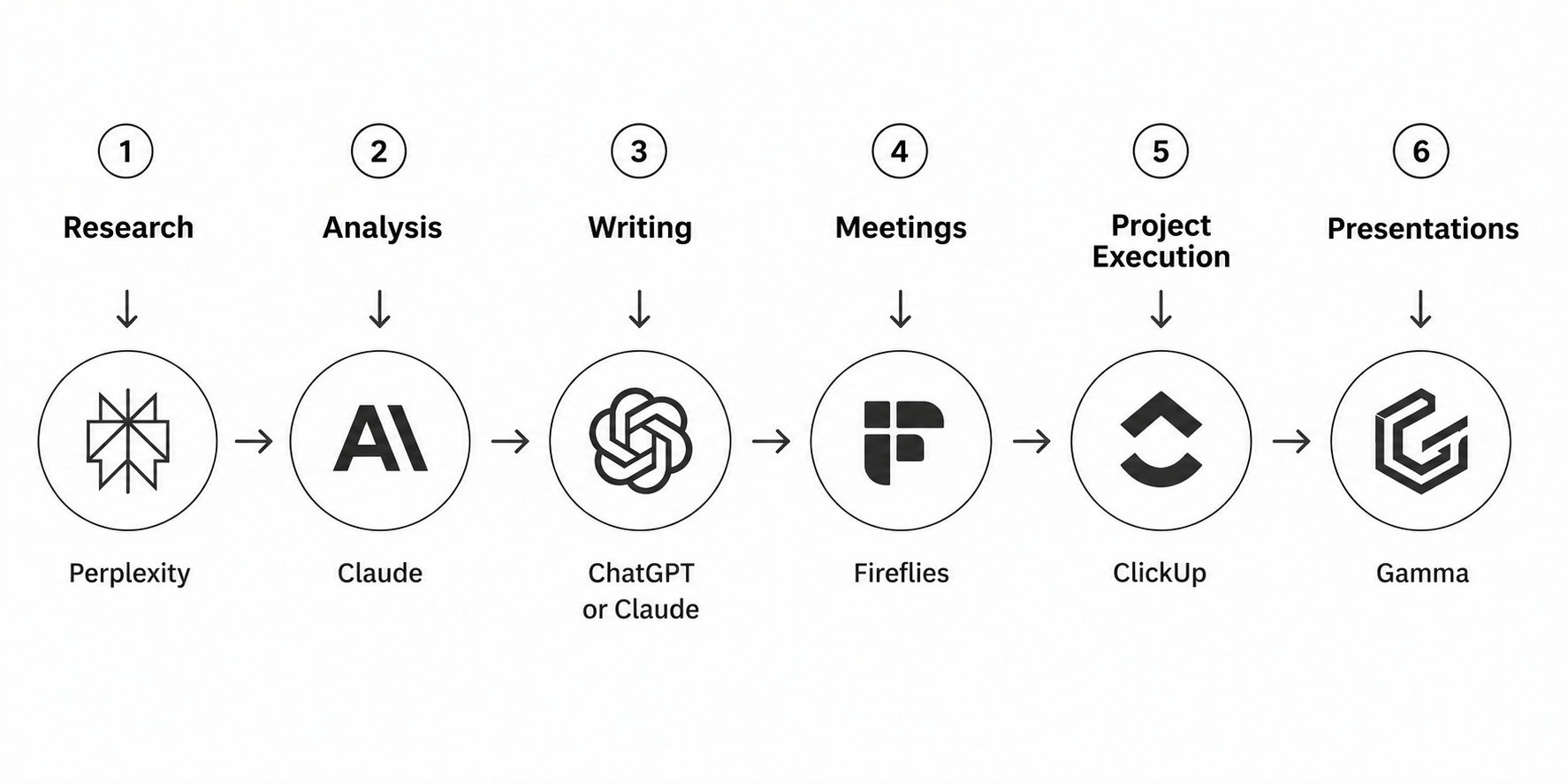
Instead of replacing your existing process, AI strengthens each stage of the workflow.
Recommended Starting Point
There is no need to adopt all ten AI tools presented. Most professionals will achieve optimal results by selecting one or two tools that align with their specific workflow and integrating them purposefully. To do so, begin by systematically tracking your daily work to identify the most repetitive task or the principal bottleneck in your routine. Quantify the time spent on these activities over several days to establish clear priorities. After pinpointing where the majority of your time is expended, select an AI tool from this guide that directly targets that area of inefficiency. Integrating the chosen tool into your daily workflow and consistently monitoring its impact will maximize effectiveness. By taking these concrete, data-driven steps, you ensure your AI tool adoption is both strategic and sustainable, yielding immediate benefits without overwhelming yourself with unnecessary options.
Examples of AI tools for your workflow:
If you are a freelancer
Start with:
- ChatGPT
- Perplexity
If you manage projects
Start with:
- Fireflies
- ClickUp
If you create presentations
Start with:
- Claude
- Gamma
If you work with large amounts of information
Start with:
- Claude
- Notion AI
Final Thoughts
The objective isn’t to use more software. The objective is to reduce repetitive work and create more space for focused, meaningful tasks.
Start with the tool that solves your biggest bottleneck today. Small improvements compound quickly. And in many cases, reclaiming even one hour per day can have a greater impact than adopting an entirely new productivity system.
At LOOM, we believe better systems create better work.
Not by adding complexity.
By removing it.