How I Use 6 AI Tools Together To Save Hours Every Week
Most people use AI tools one at a time.
People often use ChatGPT to write emails, Perplexity for research, or Gamma to create presentations. While each tool is useful individually, work rarely occurs in isolated steps.
A typical project involves research, analysis, writing, meetings, project management, and communication. Information moves from one stage to the next, often requiring manual copying, reformatting, and reorganization along the way.
Significant productivity losses occur during the manual transfer, reformatting, and organization of information between each stage.
Before building this workflow, I often found myself copying information between tools, rewriting notes, and losing track of project details. Over time, I started assigning a specific role to each tool and treating them as part of a single system.
Rather than viewing AI as a collection of separate tools, I use them together as parts of an integrated workflow in which each tool has a specific role. By arranging these tools in a clear sequence, I show how systematically combining multiple AI tools helps reduce unnecessary repetition, decrease context switching, and create a more efficient process from initial idea to final result. This workflow-oriented approach to AI use offers a practical way to increase productivity and simplify complex projects.
The following section outlines the six-stage workflow I use most frequently, previewing how each AI tool supports a distinct phase of the overall process.
If you’re looking for specific tools, you may also find useful our guide to 10 AI Tools That Save 5+ Hours Per Week.
Step 1 — Research
Tool: Perplexity
Every project begins with a question.
It might be a blog article, a software evaluation, a business decision, or a presentation.
Before anything can be created, information needs to be gathered.
Traditional online research usually means opening lots of browser tabs, comparing sources, and taking notes by hand. This method still works, but it can be slow and feel scattered.
Perplexity helps streamline this stage.
I use it to:
- find relevant sources quickly
- identify key concepts
- explore different viewpoints
- gather current information
- build an initial understanding of a topic
The goal is not to replace critical thinking. The goal is to spend less time searching and more time understanding.
Output
Research notes, source material, and background information.
To ensure a seamless transition from research to analysis, I export my research notes and sources from Perplexity as .txt or .md files, and often import them directly into an application such as Claude. This process establishes a direct connection between the research and analysis stages, making it straightforward to upload or paste the collected material into Claude for further examination. By systematically organizing all information within a designated application and preparing it for the next stage, I facilitate efficient integration between tools and reduce the likelihood of overlooking valuable information during step transitions.
Step 2 — Analysis
Tool: Claude
Research alone is rarely enough. Most projects fail not because information is missing, but because information remains unorganized.
After gathering material, I move to analysis. This is where Claude becomes particularly useful.
I often use it to:
- identify patterns
- compare perspectives
- organize large amounts of information
- create outlines
- simplify complex topics
At this stage, I am not producing final content. I am building structure. Instead of a collection of disconnected notes, I now have a framework that can guide the rest of the project.
Output
Insights, structure, and organized information.
Step 3 — Writing
Tool: ChatGPT
Once the structure is clear, writing becomes much easier.
One of the biggest obstacles in content creation is starting from a blank page. The research is complete. The ideas are organized. The next step is transforming those ideas into a draft.
I use ChatGPT to create the first version of:
- articles
- reports
- project documentation
- email drafts
- summaries
The first draft is not the final product. It is simply a starting point. Having a draft available immediately makes editing and refinement significantly faster than writing everything from scratch.
Output
A complete first draft ready for review and editing. At this point, I take a few minutes to reread the draft with fresh eyes. I check for clarity, flow, and whether all main ideas are covered. Often, I run the draft through ChatGPT again to get suggestions for improvement or alternative wording. For example, if a paragraph seems repetitive or lacks clarity, I might prompt ChatGPT to suggest a concise revision or to expand on a particular argument. This extra review step helps catch issues early and makes the final editing process much smoother. Reflecting on this iterative process, I find that leveraging both AI and personal review significantly enhances the quality and coherence of the final draft.
Step 4 — Meetings
Tool: Fathom
Meetings often create additional work after the meeting ends.
Someone needs to take notes.
Someone needs to summarize decisions.
Someone needs to identify action items and follow-up tasks.
These activities may take almost as much time as the meeting itself.
Fathom helps automate much of that process.
Instead of focusing on note-taking, I can focus on the conversation.
After the meeting, I receive:
- summaries
- key discussion points
- decisions
- action items
This reduces administrative work and makes important information easier to review later.
Output
Meeting summaries and actionable next steps.
Step 5 — Project Management
Tool: ClickUp AI
Ideas only become valuable when they turn into action.
Research, analysis, writing, and meetings all generate information.
Without a system for execution, that information often remains unused.
This is where project management becomes essential.
I use ClickUp AI to:
- organize tasks
- assign priorities
- create project plans
- track progress
- maintain visibility across projects
I use ClickUp AI because it combines traditional project management features with AI-driven automation and suggestions. Its integrations with other tools and customizable workflows make it straightforward to manage complex projects without losing track of important information. Although alternatives exist, I continue to use ClickUp AI because it offers an efficient balance between task management, collaboration, and smart recommendations once the team overcomes these initial obstacles.
At this stage, the workflow shifts from planning to execution. The project becomes measurable and manageable.
Output
Tasks, priorities, and project structure.
Step 6 — Presentations
Tool: Gamma
Many projects eventually need to be shared. That may mean presenting ideas to clients, colleagues, stakeholders, or team members.
Creating presentations manually can be surprisingly time-consuming. Research needs to be summarized. Content needs to be organized. Slides need to be formatted.
Because the previous stages of the workflow have already created structured information, Gamma can generate a strong starting point very quickly. Instead of beginning with an empty slide deck, I start with a presentation that already contains the main ideas.
The final result still benefits from human review and editing, but the initial workload is dramatically reduced.
Output
A presentation ready for refinement and delivery.
The Workflow
At first glance, these tools may appear unrelated.
In practice, they form a simple workflow where each tool performs a specific role.
Research generates information.
Analysis creates structure.
Writing creates content.
Meetings generate decisions.
Project management creates execution.
Presentations communicate outcomes.
The process looks like this:
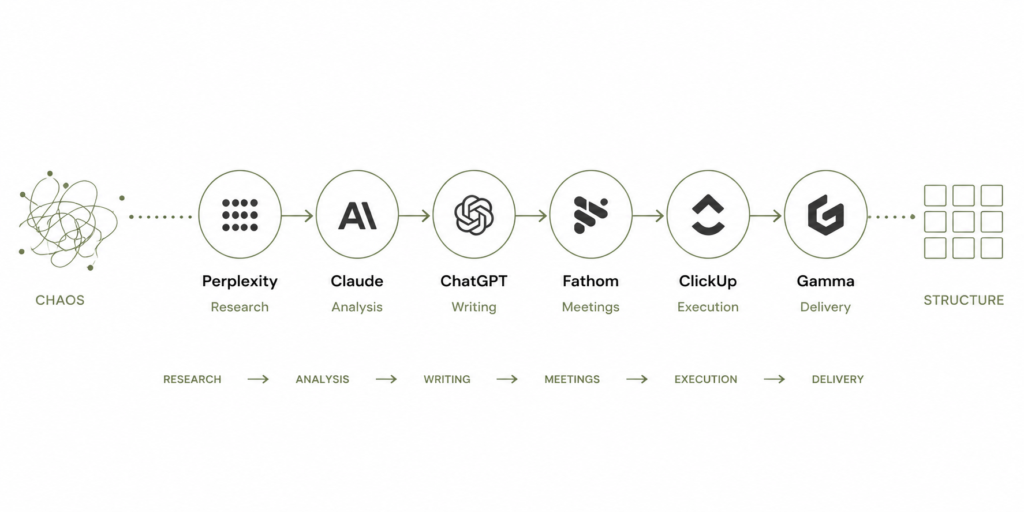
The workflow starts with information gathering and ends with communication and execution.
Each stage builds on the output of the previous one, reducing the need for manual reorganization and repetitive work.
This is what transforms a collection of individual AI tools into a practical system.
Why This Workflow Saves Me Time
Before adopting this workflow, I often copied research notes between documents, reformatted information, and reorganized the same material multiple times. Assigning a clear role to each tool significantly reduced that friction.
In this workflow:
- Perplexity gathers information.
- Claude organizes information.
- ChatGPT creates content.
- Fathom captures conversations.
- ClickUp manages execution.
- Gamma communicates results.
Instead of performing every step manually, each tool contributes to a larger system.
The result is a workflow that feels more organized, more predictable, and significantly faster.
Conclusion
AI becomes much more useful when it is treated as part of a system rather than a collection of separate applications.
You do not need to use these exact tools. You may already have alternatives that perform similar functions.
The important idea is assigning a clear role to each tool in your workflow.
When information moves smoothly from one step to the next, repetitive work decreases, context switching becomes less frequent, and more time can be spent on meaningful work.
If repetitive work is your biggest productivity challenge, you may also want to read 7 Repetitive Tasks You Should Stop Doing Manually.
That is where the real value of AI often comes from—not a single application, but a well-designed system.